If you run a Shopify store, there’s a good chance you now have a file at yourstore.com/llms.txt that you never created. Since mid 2026, Shopify has been auto generating this file, along with a companion file at /agents.md, for every store on the platform, as part of its push into agentic commerce.
That sounds like good news at first. AI shopping assistants like ChatGPT, Gemini, and Claude are increasingly the way people discover products, so having something in place for them to read feels like a win. The catch is what’s actually inside that default file, and how much it does or doesn’t help your store get recommended.
Why This Matters Right Now
The way people shop has quietly shifted over the past year. Instead of typing a search term into Google and clicking through a list of results, more shoppers are asking an AI assistant directly. They describe what they want, and the assistant suggests specific products, sometimes from stores the shopper has never heard of before.
That’s a huge opportunity for smaller and mid sized Shopify stores. It’s also a real risk if your store isn’t set up to be understood by the systems doing that recommending. A store with rich, structured product data has a real shot at being suggested. A store with thin, generic data tends to get skipped entirely, even if the products themselves are excellent.
This is exactly why the difference between Shopify’s default AI file and a properly structured feed matters so much right now, not in some distant future.
What Shopify Gives You by Default
The default file Shopify generates is real and technically valid. It sits at the standard location, follows the basic format AI systems expect, and gets served automatically without you lifting a finger.
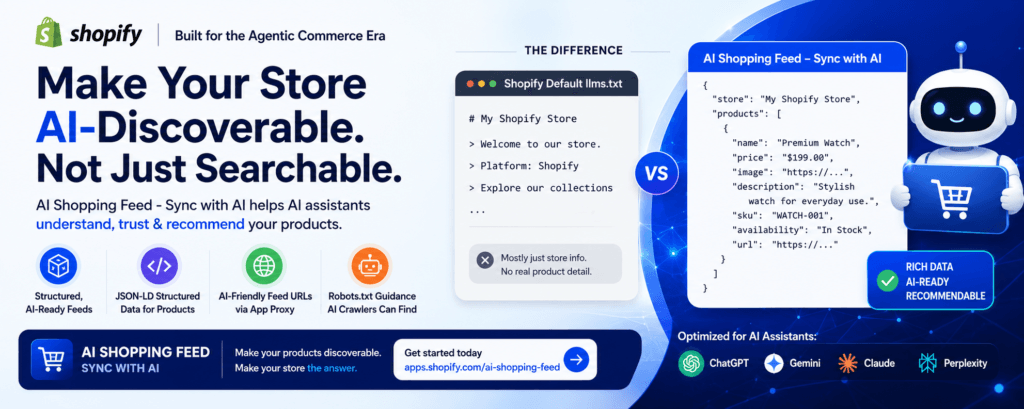
But technically valid and actually useful aren’t the same thing. The default version is intentionally minimal. It’s mostly just your store name and a short note confirming the store runs on Shopify. It doesn’t describe what you sell, who your products are for, or what makes your store different from the next one an AI agent might look at. In some cases, it even includes a line pointing back to Shopify’s own platform rather than keeping the focus on your store.
In other words, every Shopify store now has a file. Very few of them have a file that says anything meaningful about their actual catalog. If you open your own store’s version right now, there’s a good chance you’ll see just a few lines. A name, a short sentence, maybe a generic link or two. Nothing that would help an AI system understand what makes your products worth recommending over a competitor’s.
Why That Gap Matters
AI shopping assistants don’t browse a store the way a human does, scrolling through images and reading marketing copy. They rely on structured, machine readable information to understand what a product is, what it costs, and whether it matches what a shopper is asking for.
A generic file that just confirms your store exists doesn’t give an AI system much to work with. If a shopper asks an AI assistant to find a specific type of product, the assistant needs detailed, structured data to match your store to that request, not a one line summary that could apply to millions of other Shopify stores running the same default file.
Think about how many Shopify stores exist. Millions of them, all currently running some version of that same auto generated file. If your store’s file looks nearly identical to thousands of others, there’s very little for an AI system to latch onto that would make it choose your products specifically.
This is where the difference between having a file and having a real AI ready feed starts to matter for actual discoverability.
What a Real AI Ready Setup Looks Like
Getting properly discovered by AI shopping assistants generally comes down to a few layers working together.
Clean, complete product data is the foundation. That means titles, descriptions, and attributes that AI systems can parse accurately, not vague marketing language. A product titled clearly, with specific details about size, material, or use case, gives an AI system far more to work with than a clever brand name alone.
On top of that, JSON LD markup embedded in your product pages clearly defines things like price, availability, and product type in a format both search engines and AI systems recognize. This kind of structured data has been part of good SEO practice for years, and it turns out to matter just as much, if not more, for AI discovery.
A curated, AI ready feed goes further still, mapping out your products, categories, and key pages rather than offering a bare minimum summary. It gives an AI system a clear map of what your store actually sells, organized in a way that’s easy to scan and match against a shopper’s request.
And none of it matters if AI bots can’t actually reach and read that data, which usually comes down to proper robots.txt configuration. A perfectly structured feed is useless if crawlers are accidentally blocked from reaching it.
Shopify’s default file covers the bare presence of an AI discovery file, but it doesn’t handle the structured, product level detail that makes an AI system confident enough to recommend a specific item.
How AI Shopping Feed Sync with AI Fills the Gap
This is exactly the space the AI Shopping Feed app was built for. Instead of leaving your store with just the generic default, it builds out the structured layer that AI platforms actually need to understand and recommend your products.
Specifically, the app handles syncing your Shopify catalog into structured, AI ready feeds, rather than relying on a static, generic summary. It generates JSON LD structured data for your products, so AI systems and search engines can accurately read pricing, availability, and product details. It creates AI friendly feed URLs served through your own store domain App Proxy, keeping everything under your own branded domain rather than a generic third party link. It provides robots.txt guidance, so AI crawlers are actually able to find and access your feed without running into avoidable blocks. It includes discovery optimization tuned specifically for AI shopping platforms, not just traditional search engines. And it gives you a feed analytics dashboard, so you can actually see how your data is being accessed instead of guessing.
Where the default Shopify file tells an AI agent that your store exists, this setup gives that same agent something to actually work with. Real product data, structured in a way built for machine reading rather than human browsing.
Default vs Structured: The Practical Difference
Think of it this way. The default llms.txt file is like a business card that says “we sell things, ask us more.” Technically an introduction, but not enough for someone to act on. A structured product feed with JSON LD markup is closer to a full catalog handed directly to the AI system, with exactly the details it needs to match a shopper’s request to your specific products.
For most merchants, the default file is a fine starting point simply because it’s already there. But if the goal is to actually show up when someone asks an AI assistant to find a product like yours, the structured layer is where that outcome gets decided.
A Few Common Misconceptions
A lot of merchants assume that because Shopify handles the default file automatically, there’s nothing more to do. That’s understandable, but it treats a baseline as if it were a finished solution.
Others assume that structured data and AI feeds are only worth the effort for large enterprise stores with massive catalogs. In practice, smaller stores often have the most to gain, since a clear, well organized feed can help a niche product stand out precisely because it isn’t buried under thousands of similar SKUs the way a big retailer’s catalog might be.
There’s also a common assumption that once a feed is set up, it doesn’t need attention again. Product catalogs change constantly though, and a feed that isn’t kept in sync with new products, updated pricing, or discontinued items can end up doing more harm than good.
Getting Started
If you’re a Shopify merchant and haven’t looked past the default file yet, it’s worth checking what your store’s version actually contains. You might be surprised how little product specific detail is in there.
From there, building out a proper structured feed is the more direct path to AI visibility. AI Shopping Feed Sync with AI handles that setup without requiring code changes or a developer, keeps your feed synced automatically as your catalog changes, and includes a 14 day free trial to test it against your own catalog before committing to anything.
Try AI Shopping Feed Sync with AI: https://apps.shopify.com/ai-shopping-feed